If PO references a quote and has living material without a delivery date:
For colleges and universities, attempt to obtain a delivery date from customer.
If customer is uncertain or you cannot obtain a date.
Convert the living/perishable item to a TBN.
Any stock items need to be converted to an SO.
For high schools and below, go ahead and convert to a TBN without contacting customer.
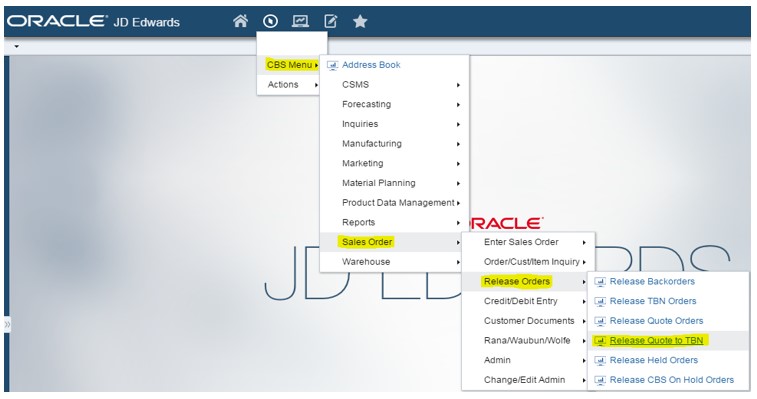
From Navigator Menu:
Click CBS Menu>>Sales Order>>Release Orders>> Release Quote to TBN
Right click on Release Quote to TBN if you would like to add as a favorite.
Select the living/perishable items (Line type LI or LX).
Follow the same procedures as Quote to SO Conversion.
It does not matter what Request Date you enter.
The TBN will not go on QO hold.
Note: If entire quote is going on a TBN, makes sure to include the freight line during conversion.
Note: Some POs have living items that go on a TBN and non-living that goes on an SO.
If freight is included on the quote:
Apply the freight to the SO.
Then add a header attachment in the 2nd text box stating that freight was added to SO (provide the SO number) and not to add additional freight when TBN is released.