Skip to content
|
Help Center
Search
Search
Sign In
Substitute Items
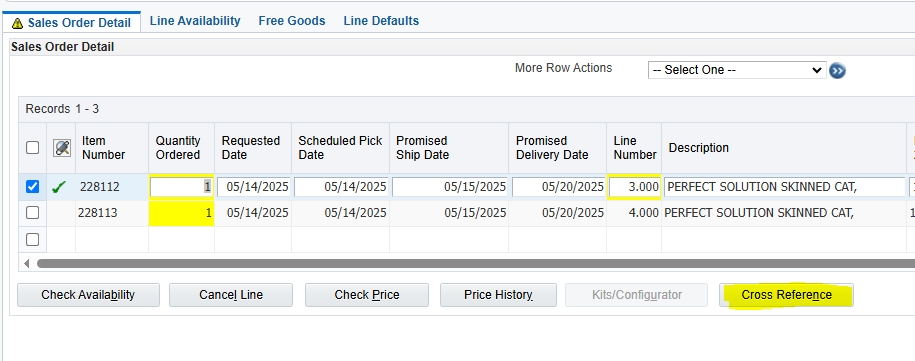
For some back ordered items you may receive the following message at top of order:
You will also see a check mark beside the item number field.
This will allow you to add a substitute item of equal or more value for the back ordered item.
ONLY
use this function during phone orders.
For all other order types
, process with standard back order procedures.
After keying the item and receiving the backorder notice:
Highlight the line on back order.
Click CROSS Reference.
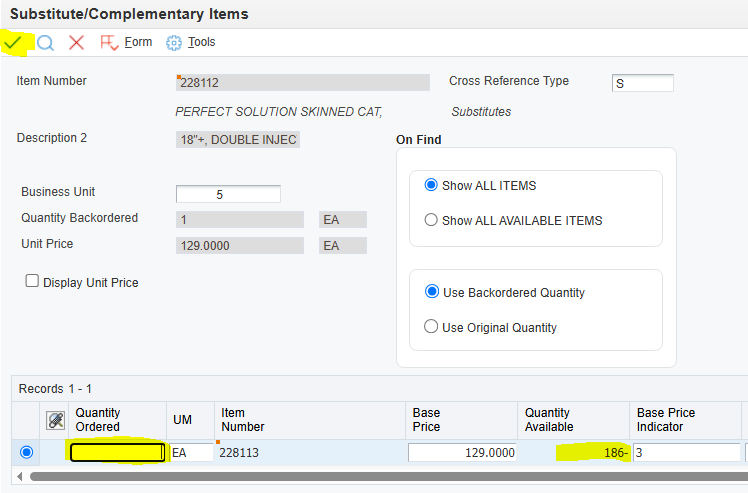
Enter the quantity ordered.
Check to make sure there is enough quantity available to ship.
If not enough available, click the red X to leave the original item on backorder and follow the backorder procedure.
Click the green check if there is enough quantity available to make the substitution.
The backordered item will be marked out by the system.
Add dates to substitute and come off the line.
Last status will be 916 (Added as Subst/Associated Item).
The line number will end in .001.
Complete order as usual.
Username or Email Address
Password
Remember Me
Log In
Lost your password?